Goal
To design a flexible and intelligent Conversational AI platform demo tailored for large enterprise deals. The platform aimed to demonstrate how conversational AI could streamline service workflows, enhance document comprehension, and provide traceable AI reasoning.
My Role
UX/UI Designer – responsible for experience strategy, interface design, component systems, and collaborating on integration flows with the engineering team.
Problem Space
Visualize how conversational AI fits into existing systems (e.g., ServiceNow)
Query internal documentation with natural language
Customize UI to match brand guidelines and internal tools
Trust AI recommendations through transparency of reasoning
Solution Highlights
Customizable UI Framework
Built modular UI components in Figma for quick theming and rebranding.
Designed layouts adaptable to support chat, documents, and insights panels.
ServiceNow Integration
Mapped out user journeys for support agents and IT staff.
Designed intuitive flows to raise, track, and update tickets via conversation.
Document Comprehension
Created a chat interface for users to upload and query files.
Designed response formats: highlights, summaries, citations.
X-Ray Feature (AI Chain-of-Thought View)
Introduced a toggleable panel showing how the AI thinks.
Visualized source docs, intermediate reasoning steps, and confidence indicators.
Design Process
Discovery: Competitive research, stakeholder interviews, and technical feasibility workshops.
Wireframing: Low-fidelity flows to explore interactions across different use cases.
Prototyping: High-fidelity Figma prototype simulating integration and dynamic content.
Validation: Iterative reviews with internal SMEs and client-facing teams.
User flow and Initial wireframes
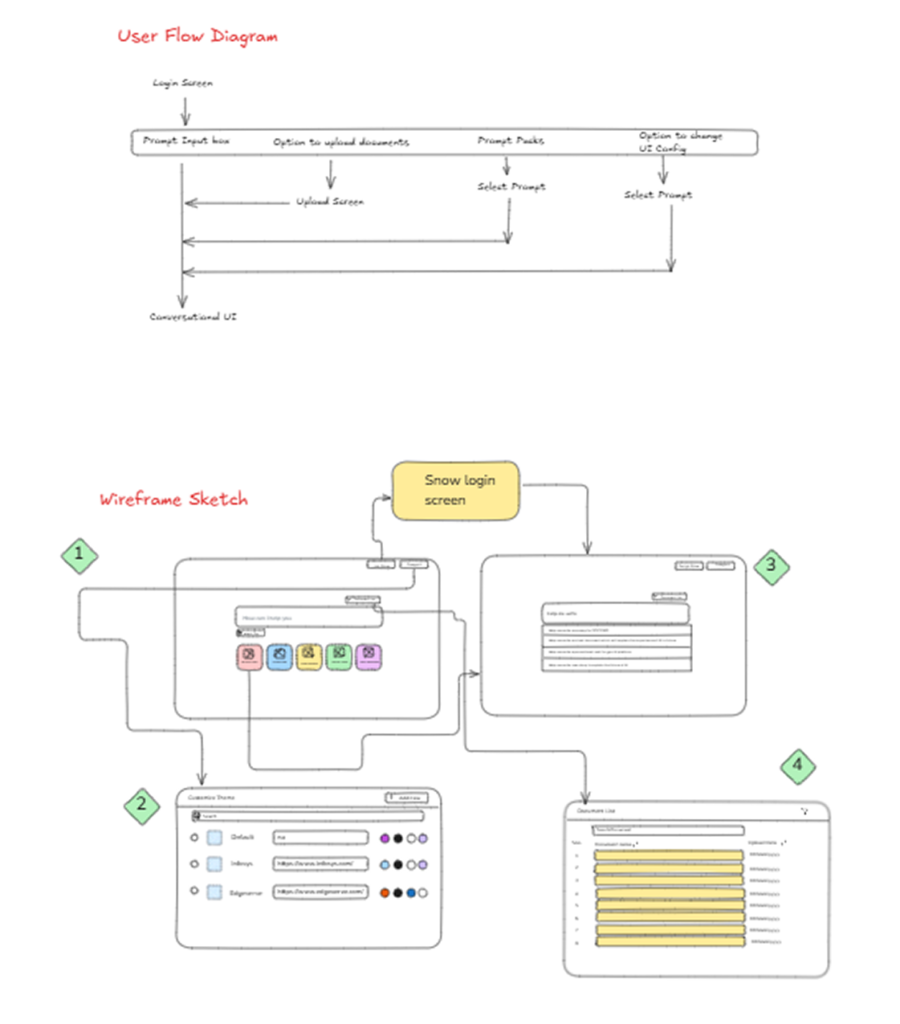
Usability Testing Summary
After conducting usability testing on the rough wireframe of the Conversational AI Platform, several usability and experience issues were identified. These findings helped guide improvements to the platform’s flexibility, privacy, and accessibility.
Key Issues Identified
- UI Customization Lacked Clarity & Flexibility
- Problem: Users found it difficult to make UI changes due to the absence of a clear edit option.
- Impact: Led to confusion and reduced confidence in customizing the experience.
- Insight: Users also had no way to preview how the fetched brand colors would appear across the page, making branding unpredictable.
Suggested Fix: Introduce an Edit UI mode with a real-time visual preview and reset/default options. Add option to change the color or create a color pallet from scratch.
- Document List Display Raised Privacy Concerns
- Problem: Showing a complete list of uploaded documents during conversation raised red flags about data privacy and client confidentiality.
- Impact: Clients may hesitate to use the platform in regulated or sensitive environments.
- Insight: Exposing all documents by default could lead to unauthorized information access.
Suggested Fix: No document will get saved in the software to avoid privacy breach.
- Language Neutralization & Agent Handoff Gaps
- Problem: While the page language adjusted to the user’s choice, it was unclear how the language consistency would be maintained during human handoff.
- Impact: Breaks in user experience when transitioning from AI to human support — especially in multilingual contexts.
- Insight: Users expect the human agent to maintain the same language used in the AI interaction.
Suggested Fix: If user selects a language lets say French, then user will see everything in French. In case user asks a human agent to join then this agent will have the conversation in his selected language and user language will come as the translated language.
Final Result
Impact & Differentiation
Measurable Impact
- Accelerated Decision-Making: Stakeholders reported faster understanding and actionability due to the X-Ray reasoning panel, which made AI responses traceable and trustworthy.
- Improved Onboarding Time: Thanks to the modular UI kit and customizable theming, teams were able to demo the platform with minimal setup effort for various enterprise environments.
- Enhanced Trust in AI: Transparent document citation and step-by-step reasoning increased user confidence, especially in regulated sectors like IT compliance and legal support.
- Increased Client Engagement: The ability to simulate real integrations (e.g., with ServiceNow) in a demo environment led to deeper stakeholder buy-in during sales discussions.
Why It’s Different from Existing AI Platforms?
- Visualized AI Chain-of-Thought: Unlike many black-box AI platforms, this prototype included a transparent AI decision view, offering intermediate reasoning steps, source documents, and confidence levels—bridging the gap between human and machine understanding.
- Tailored for Enterprise Realities: Most conversational AI tools are generic or consumer-focused. This platform addressed enterprise-specific concerns like document privacy, multilingual agent handoff, and ITSM workflows (via ServiceNow integration).
- Real-Time UI Customization: Unlike fixed-skin platforms, this solution featured a live-editable UI framework allowing real-time brand theming—crucial for large clients who require brand consistency across internal tools.
- Privacy-First Document Handling: Documents were handled with a non-persistent architecture, alleviating concerns around sensitive data exposure—a critical differentiator for compliance-heavy industries.